
How a Program Works: From Source Code to Output — A Beginner's Guide Copy article title
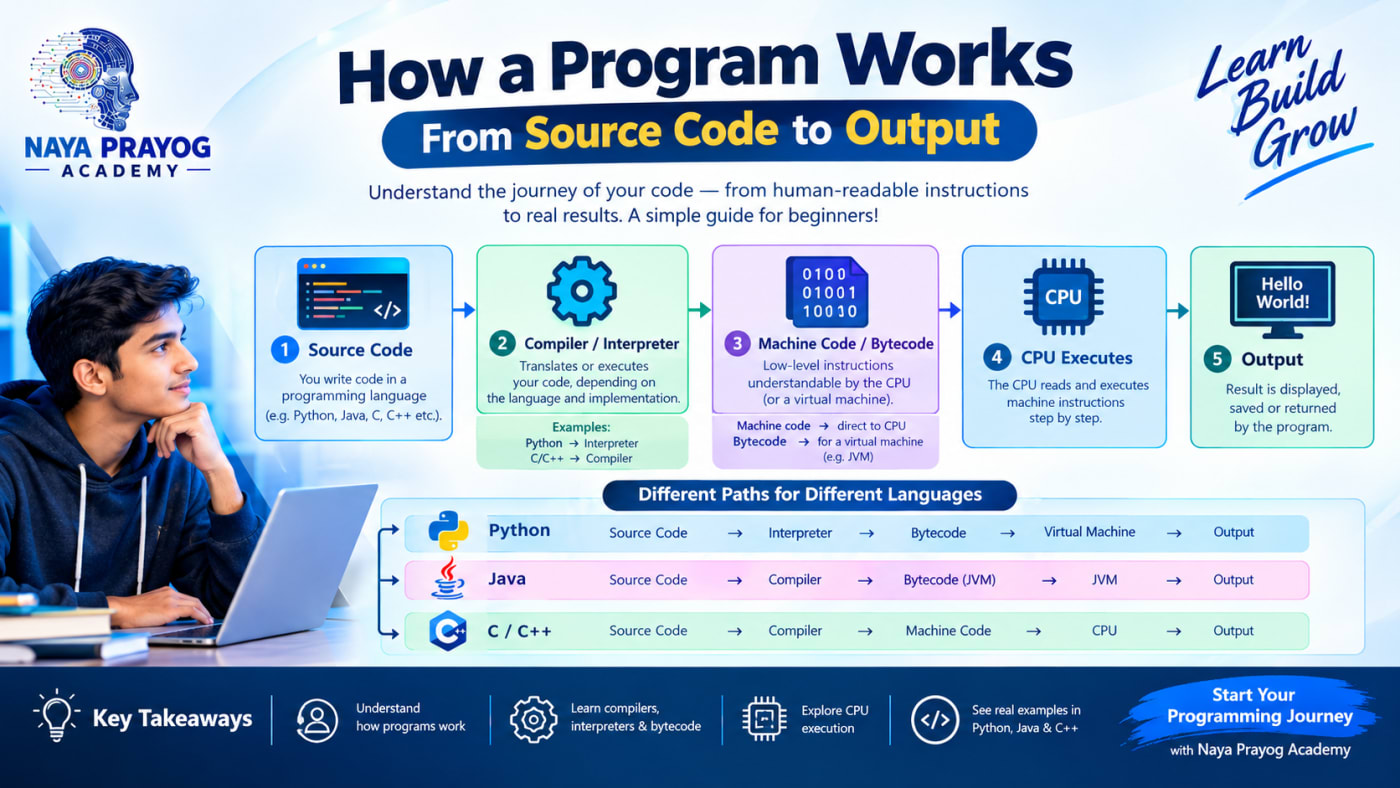
How a Program Works: From Source Code to Output — A Beginner's Guide
Have you ever wondered what happens when you write a few lines of code and press the Run button? How does a computer understand instructions written in Python, Java, C, or C++ and turn them into a result on your screen?
Every software application, website, mobile app, and computer program follows a process to transform programming instructions into useful results.
Understanding this process is one of the most important foundations of learning programming. In this guide, we will explore how a program works, what compilers and interpreters do, how machine code and bytecode are used, and how the CPU executes instructions to produce the final output.
1. What Is a Program?
A program is a set of instructions written to tell a computer how to perform a particular task.
Programs can perform simple operations, such as displaying a message, or complex tasks, such as processing payments, analyzing business data, managing student records, or running an artificial intelligence application.
For example, consider this Python program:
print("Hello, World!")This program instructs Python to display the text Hello, World!.
Output:
Hello, World!Although the example is simple, the same fundamental idea applies to much larger applications: a developer writes instructions, the appropriate software tools process them, and the program produces a result.
2. Step One: Writing Source Code
Source code is the human-readable set of instructions written in a programming language.
Programmers use languages such as Python, Java, C, and C++ to express calculations, decisions, repetitions, data processing, and other operations.
For example:
a = 10
b = 20
total = a + b

print(total)
Output:
30In this program, the variables a and b store values, the addition operator calculates their sum, and the print() function displays the result.
The code is easy for a programmer to read and understand. However, a computer's processor does not directly execute ordinary Python, Java, C, or C++ source code in its original form. The language implementation and runtime environment handle the process of translating or executing the instructions.
3. Step Two: Compilation or Interpretation
After source code is written, it must be processed according to the programming language and its implementation.
Two important concepts are compilation and interpretation.
What Is a Compiler?
A compiler is a software tool that translates source code into another representation, often machine code or an intermediate form.
Depending on the language and implementation, compilation may involve several stages, including syntax analysis, semantic checks, optimization, and code generation.
C and C++ commonly use compilers to generate native machine code.
For example, a C program might contain:
#include <stdio.h>

int main(void) {
    printf("Hello, World!\n");
    return 0;
}
A typical C compiler toolchain processes this source code and produces an executable program that can run on a compatible system.
What Is an Interpreter?
An interpreter is a program that executes code according to a language's rules, often using an internal representation rather than requiring the programmer to create a standalone native executable first.
Python is commonly described as an interpreted language. In the standard CPython implementation, source code is compiled into bytecode, which is then executed by the Python virtual machine.
This is why the simple statement that every interpreter executes source code directly, line by line, is an oversimplification.
Compiler vs. Interpreter
A compiler often translates code into a target representation before execution. An interpreter executes instructions through a runtime system.
Modern language implementations can combine both approaches. Some virtual machines also use just-in-time compilation to improve performance.
The important point is that the exact process depends on the programming language, its implementation, and the execution environment.
4. Step Three: Machine Code and Bytecode
After compilation or other language-processing stages, a program may be represented as machine code or bytecode.
What Is Machine Code?
Machine code consists of instructions encoded in a form that a particular processor architecture can execute.
Native machine code is closely associated with the processor architecture and its instruction set.
For example, a compiler may translate a C program into machine instructions suitable for a compatible x86-64 or ARM processor.
What Is Bytecode?
Bytecode is an intermediate instruction format designed for execution by a virtual machine or runtime.
It is not necessarily native machine code for the physical CPU.
For example, Python's CPython implementation uses Python bytecode, while Java commonly compiles source code into Java bytecode that runs on the Java Virtual Machine (JVM).
Bytecode allows a language runtime to manage execution and can support portability across compatible runtime environments.
5. Step Four: The CPU Executes Instructions
The Central Processing Unit, or CPU, is a major component responsible for executing program instructions.
When a program runs, its instructions are executed through the processor or an appropriate runtime environment that ultimately uses the computer's processing resources.
At a simplified level, the CPU repeatedly fetches instructions, decodes them, and executes them.
Depending on the instruction, the processor may perform arithmetic, compare values, move data, or change the flow of execution.
For example, when a program calculates:
total = 10 + 20the runtime evaluates the expression and stores the resulting value in the variable total.
Modern processors use sophisticated techniques such as caching, pipelining, and parallel execution. Nevertheless, understanding the basic relationship between instructions and processing is an excellent starting point for beginners.
6. Step Five: Producing the Program Output
Output is the result produced by a program.
Depending on its purpose, a program may display text, calculate a value, create a file, update a database, return an API response, or perform another action.
Consider this Python example:
name = "Harendra"
course = "Python Programming"

print("Student:", name)
print("Course:", course)
Output:
Student: Harendra
Course: Python Programming
The program takes its stored values, processes the print statements, and displays the result in the console.
In a real application, output might instead appear on a website, inside a mobile app, in a report, or in a database.
7. How Python, Java, and C/C++ Differ
Different languages can follow different execution paths.
Python
A typical CPython workflow is:
Source Code → Python Compiler → Bytecode → Python Virtual Machine → Output
The implementation may also use caching and other runtime optimizations.
Java
A common Java workflow is:
Java Source Code → Java Compiler (javac) → Bytecode → JVM → Output
The JVM executes Java bytecode and may use just-in-time compilation to translate frequently executed code into native machine code.
C and C++
A typical native compilation workflow is:
Source Code → Compiler and Toolchain → Machine Code → Operating System Loads Program → CPU Executes Instructions → Output
The exact stages and commands vary by compiler, operating system, and build configuration.
These examples illustrate why there is no single execution pipeline that applies identically to every programming language.
8. A Practical Example: From Code to Result
Let's examine one more Python example:
price = 500
quantity = 3

total = price * quantity

print("Total Amount:", total)
Output:
Total Amount: 1500Here is what happens conceptually:
- The programmer writes the source code.
- The Python implementation checks and processes the code.
- In CPython, the code is compiled into bytecode.
- The Python virtual machine executes the relevant instructions.
- The multiplication produces the value
1500. - The
print()function displays the result.
This example represents a simple business calculation. Similar operations are used in billing software, inventory systems, e-commerce applications, and financial reports.
9. Why Should Beginners Understand This Process?
Understanding how programs work helps learners develop a stronger foundation in computer science and software development.
It helps you:
- Understand the difference between source code, bytecode, and machine code.
- Recognize the roles of compilers, interpreters, virtual machines, and CPUs.
- Understand why syntax errors and compilation errors occur.
- Learn how different programming languages execute instructions.
- Make more informed choices when selecting tools and technologies.
- Build a foundation for studying operating systems, computer architecture, and advanced programming.
These concepts also make it easier to understand what happens behind the scenes when you run a script, build an application, or deploy software.
10. Start Your Programming Journey with Naya Prayog Academy
Every professional developer begins by learning the fundamentals. Understanding how a program works is one of the first steps toward building that knowledge.
At Naya Prayog Academy, learners can explore programming and technology subjects through structured learning, practical exercises, and project-oriented study.
Learning pathways may include Python programming, web development, data science, artificial intelligence, data analytics, and other computer and IT subjects.
Whether you are a student, a beginner, or someone looking to strengthen your technical skills, start with the basics, practice regularly, and gradually move toward building real applications.
Learn. Build. Grow.
Explore Naya Prayog Academy: https://www.nayaprayog.com/academy
Website: https://www.nayaprayog.com
Contact: +91 7991327022
Conclusion
A computer program begins with source code and passes through language-specific processing and execution stages before producing a result.
Compilers translate code into another representation, interpreters and virtual machines help execute program instructions, bytecode provides an intermediate representation in some languages, and CPUs execute machine instructions.
Python, Java, and C/C++ demonstrate different approaches to this process, but they share the same fundamental goal: turning programming instructions into useful outcomes.
Once you understand these foundations, you are better prepared to explore more advanced programming concepts and begin building your own software applications.
Keep learning, keep experimenting, and keep building with Naya Prayog Academy.
Gallery
Comments
Log in to join the conversation